Local Networks
Configure the local networks consist of wired LAN Ethernet and wireless Wi-Fi hotspots.
Physical LAN Port
Section titled “Physical LAN Port ”The physical LAN port on the EZR35-5G router is the RJ45 PoE&LAN port. While connecting it to a PoE injector, it outputs Ethernet signals to the LAN port on the PoE injector. Check more on the PoE connections.
Logical LAN Interface
Section titled “Logical LAN Interface”The 5G router’s logical LAN interface controls the local intranet network, which bridges the physical LAN port and wireless Wi-Fi hotspots.
The LAN interface utilizes a static IP address and operates a DHCP server to assign IP addresses to client devices. It should be configured as a bridge (br-lan) to combine multiple physical interfaces into one network.
Local Intranet Settings
Section titled “Local Intranet Settings”To modify the local network settings, go to “Network > Interfaces” and click the “Edit” button on the LAN (bar-lan) interface or click the tab “LAN” on the top navigation bar.
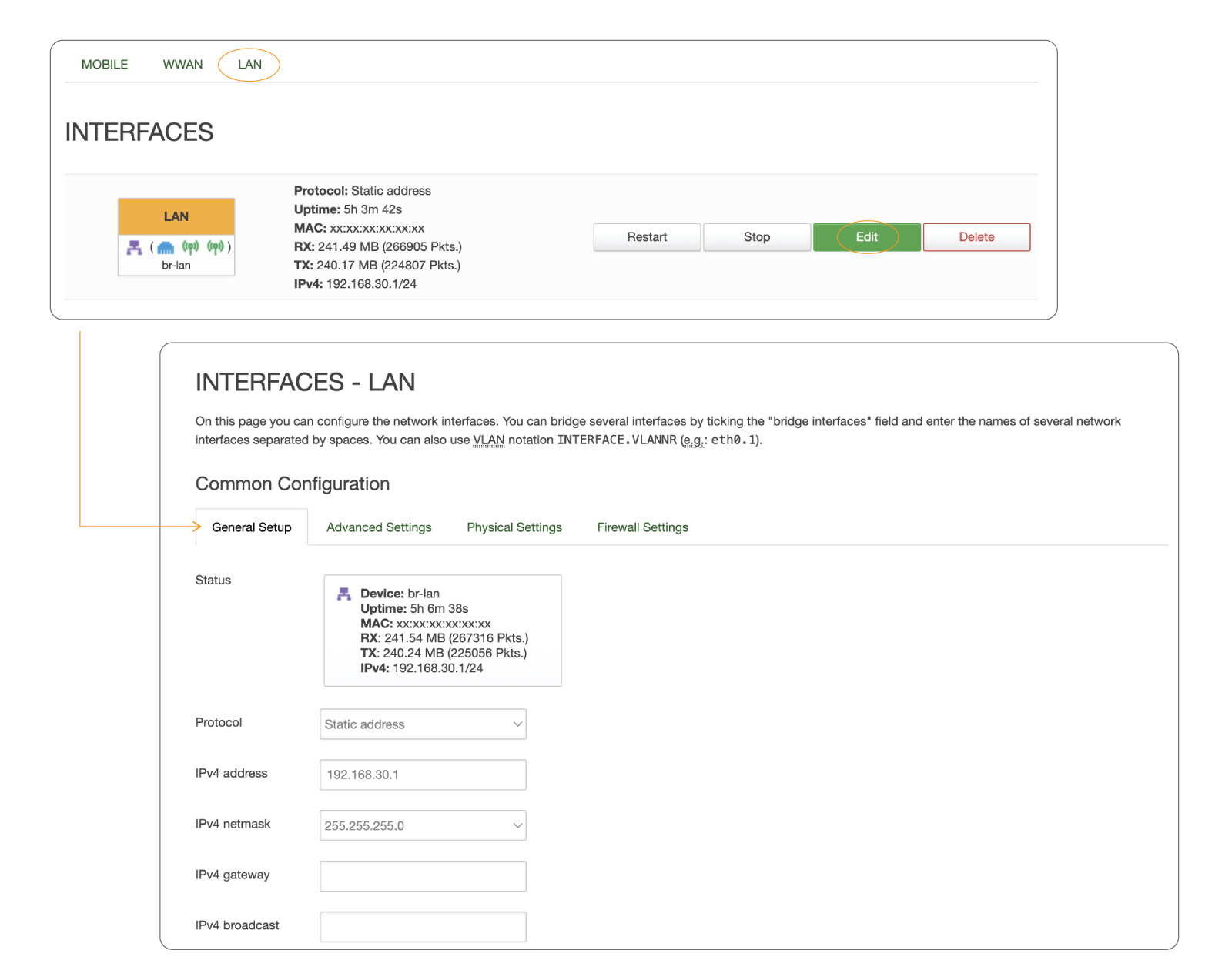
EZR35-5G Router LAN Interface IP Settings
General IP Settings
Section titled “General IP Settings”Under the “General Settings” tab, we can modify the router’s IP address, netmask, gateway address, and broadcast address.
| Field | Default Value | Description |
|---|---|---|
| Protocol | Static Address | The LAN interface should use the default value of "Static Address." |
| IPv4 Address | 192.168.30.1 | The IP address of the router and gateway for its intranet network. |
| IPv4 Netmask | 255.255.255.0 | Netmask is used to define how "large" the LAN network is. |
| IPv4 Broadcast | 192.168.30.255 | DHCP clients use broadcast to find and send requests to their respective servers. |
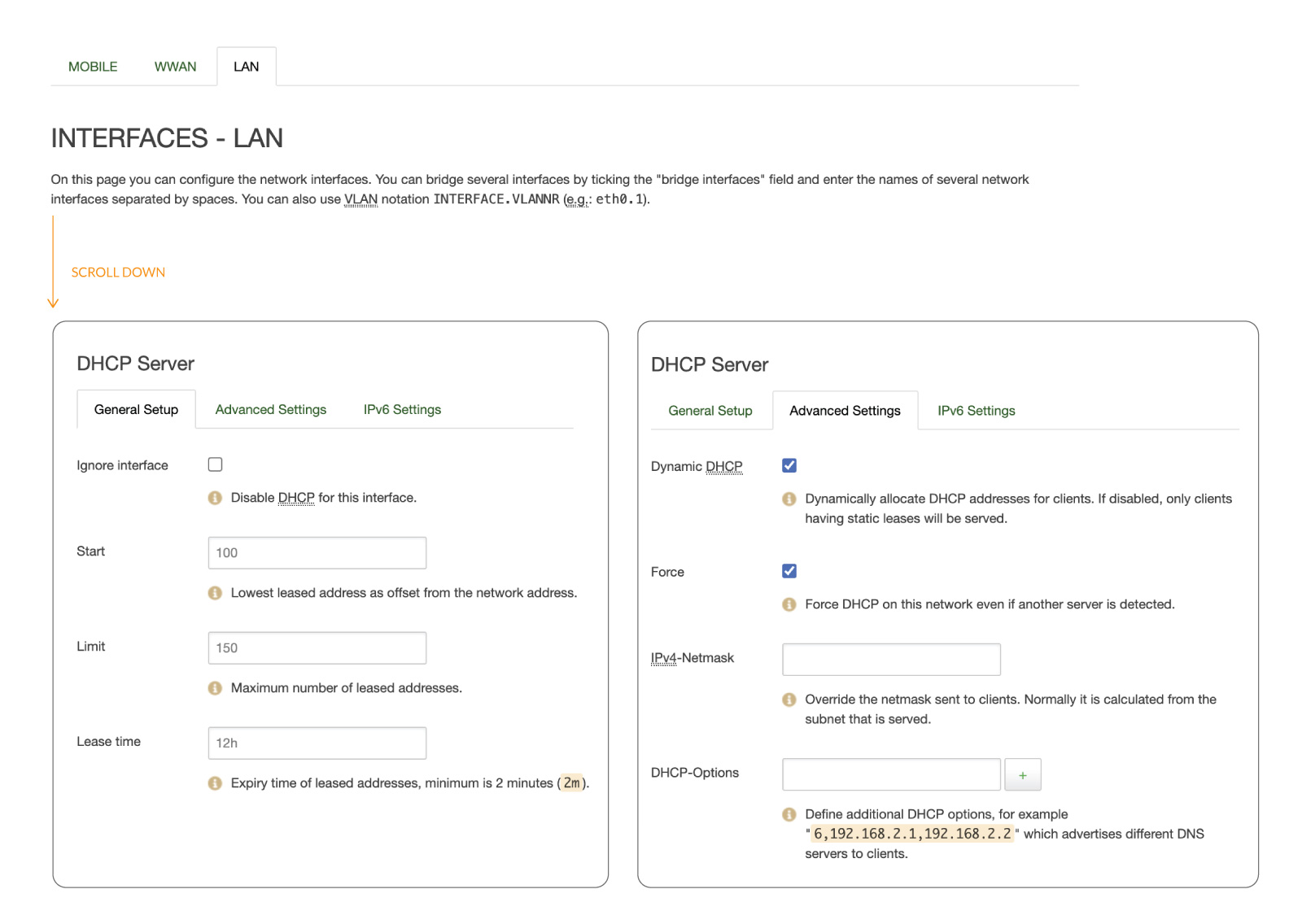
EZR35-5G Router LAN Interface DHCP Server Settings
DHCP Server
Section titled “DHCP Server ”Scroll down to the “DHCP Server” section, and under the primary “General Setup” tab, we can modify the DHCP IP pool and the DHCP lease period.
The DHCP server can automatically configure connected devices’ TCP/IP settings and assign an IP address from the available IP pool. To disable the DHCP server, select the “Ignore Interface” checkbox under the general setup tab of the DHCP server.
| Field | Default | Description |
|---|---|---|
| Start | 100 | The start IP of the DHCP IP pool. For example, if the 5G router’s LAN IP is 192.168.30.1 with netmask 255.255.255.0, a valid IP address should start from 192.168.30.100. |
| Limit | 150 | Define the IP addresses the DHCP server can lease out. Continuing from the above example, if the start address is 192.168.30.100 and the server can lease out 150, available addresses will be from 192.168.30.100 to 192.168.30.249. |
| Lease Time | 12 Hours | The duration of an IP lease. Leased-out addresses will expire after the specified period, and you must request a new DHCP lease. If the device stays connected, its lease will be renewed after half the specified time has passed. For example, if the lease time is 12 hours, then every 6 hours, the device will send a request to the DHCP server asking to renew its lease. The lease time can be set in hours (h) or minutes (m). The minimum time that can be specified is 2min (2m). |
Advanced DHCP Settings
Section titled “Advanced DHCP Settings”Under the Advanced Settings tab, you can set up more configurations on the DHCP server.
| Field | Default | Description |
|---|---|---|
| Dynamic DHCP | Enable | This option enables the dynamic allocation of client addresses. If you disable it, you must input a static IP address on the connected devices. |
| Force | Disable | The force function ensures that the router always starts its DHCP server, even if another DHCP server is already running in the router’s network. |
| IPv4 Netmask | NA | It overrides the LAN netmask, making the DHCP server think it’s serving a larger or smaller network than it is. |
| DHCP Options | NA | For example, you can assign an MTU value per DHCP with "26,1470" or "option:mtu, 1470". You can add more options by clicking the plus symbol next to the field. |
Static Leases
Section titled “Static Leases ”To check the active DHCP clients and add new static leases, click “Network > DHCP and DNS” and navigate to the “Static Leases” tab.
Static IP leases reserve specific IP addresses for particular devices by binding them to their MAC addresses. It is useful when a stationary device connected to the network needs to be reached frequently, such as a NAS, printer, camera, etc.
| Field | Default | Description |
|---|---|---|
| Hostname | NA | A custom name that describes a linked device. |
| MAC Address | NA | MAC address of the linked device. |
| IPv4 Address | NA | The desirable IP address is reserved for the specified device. |
| Lease Time | NA | Use "infinite" to lock the lease permanently. |